Dynamic OG Images in Laravel with Intervention Image
Generate branded social cards for your blog posts on the fly using Intervention Image v4, with caching, custom fonts, and zero external services.
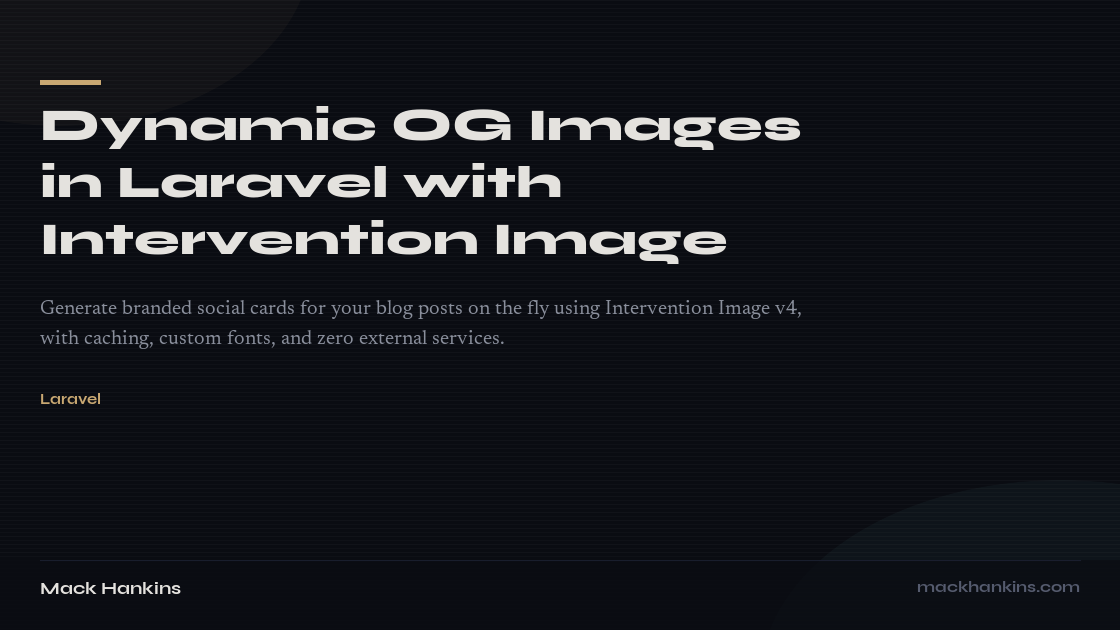
When you share a blog post on Twitter or Discord, the link preview is often the first impression. A plain URL with no image? Easy to scroll past. A branded card with the post title and your site's design language? That stops the thumb.
Most solutions involve external services or complex headless browser setups. I wanted something simpler: a single Laravel controller that generates social card PNGs on the fly, using my site's own fonts and color palette, cached for a week.
The Setup
One package, no external services:
1composer require intervention/image1composer require intervention/image
Intervention Image v4 ships with both GD and Imagick drivers. I went with Imagick for better text rendering, but GD works fine too.
I also downloaded my site's display fonts (Syne and Newsreader) as TTF files into resources/fonts/ so the generated images match the site's typography exactly.
The Route
A single route appended to the blog post URL pattern:
1Route::get('/blog/{post:slug}/og-image.png', OgImageController::class)2 ->name('blog.og-image');1Route::get('/blog/{post:slug}/og-image.png', OgImageController::class)2 ->name('blog.og-image');
The .png extension is intentional. Social platform crawlers expect an image URL, and this makes it unambiguous.
The Controller
The entire generator is a single invokable controller. The __invoke method handles caching, and a private generate method does the actual image composition:
1class OgImageController extends Controller2{3 private const WIDTH = 1200;4 private const HEIGHT = 630;56 public function __invoke(Post $post): Response7 {8 $cacheKey = "og-image-{$post->id}-{$post->updated_at->timestamp}";910 $imageData = Cache::remember($cacheKey, now()->addDays(7), function () use ($post) {11 return $this->generate($post);12 });1314 return response($imageData, 200, [15 'Content-Type' => 'image/png',16 'Cache-Control' => 'public, max-age=604800',17 ]);18 }19}1class OgImageController extends Controller2{3 private const WIDTH = 1200;4 private const HEIGHT = 630;56 public function __invoke(Post $post): Response7 {8 $cacheKey = "og-image-{$post->id}-{$post->updated_at->timestamp}";910 $imageData = Cache::remember($cacheKey, now()->addDays(7), function () use ($post) {11 return $this->generate($post);12 });1314 return response($imageData, 200, [15 'Content-Type' => 'image/png',16 'Cache-Control' => 'public, max-age=604800',17 ]);18 }19}
The cache key includes the post's updated_at timestamp, so editing a post automatically busts the cache. No manual invalidation needed.
Building the Canvas
The generate method composes the image layer by layer:
1private function generate(Post $post): string2{3 $manager = new ImageManager(Driver::class);4 $canvas = $manager->createImage(self::WIDTH, self::HEIGHT);56 $canvas->fill('#0a0c12');78 $this->drawGradientBackground($canvas);910 // Decorative amber accent line11 $canvas->drawRectangle(function ($draw) {12 $draw->size(60, 4);13 $draw->at(80, 80);14 $draw->background('#c9a872');15 });1617 $titleY = $this->drawTitle($canvas, $post->title, self::WIDTH - 80);1819 if ($post->excerpt && $titleY < 380) {20 $titleY = $this->drawExcerpt(21 $canvas, $post->excerpt, $titleY + 24, self::WIDTH - 8022 );23 }2425 // Tags, branding...26 $this->drawBranding($canvas);2728 return $canvas->encode(new PngEncoder)->toString();29}1private function generate(Post $post): string2{3 $manager = new ImageManager(Driver::class);4 $canvas = $manager->createImage(self::WIDTH, self::HEIGHT);56 $canvas->fill('#0a0c12');78 $this->drawGradientBackground($canvas);910 // Decorative amber accent line11 $canvas->drawRectangle(function ($draw) {12 $draw->size(60, 4);13 $draw->at(80, 80);14 $draw->background('#c9a872');15 });1617 $titleY = $this->drawTitle($canvas, $post->title, self::WIDTH - 80);1819 if ($post->excerpt && $titleY < 380) {20 $titleY = $this->drawExcerpt(21 $canvas, $post->excerpt, $titleY + 24, self::WIDTH - 8022 );23 }2425 // Tags, branding...26 $this->drawBranding($canvas);2728 return $canvas->encode(new PngEncoder)->toString();29}
Each draw method positions elements using absolute coordinates. The layout adapts based on title length — shorter titles get a larger font size, longer titles scale down and wrap.
Word Wrapping
Intervention Image doesn't have built-in word wrap for text, so I wrote a simple helper using PHP's imagettfbbox to measure text width and break lines:
1private function wordWrap(2 string $text, string $fontPath, int $fontSize, int $maxWidth3): array {4 $words = explode(' ', $text);5 $lines = [];6 $currentLine = '';78 foreach ($words as $word) {9 $testLine = $currentLine === '' ? $word : $currentLine . ' ' . $word;10 $box = imagettfbbox($fontSize, 0, $fontPath, $testLine);1112 if ($box && ($box[2] - $box[0]) > $maxWidth && $currentLine !== '') {13 $lines[] = $currentLine;14 $currentLine = $word;15 } else {16 $currentLine = $testLine;17 }18 }1920 if ($currentLine !== '') {21 $lines[] = $currentLine;22 }2324 return $lines;25}1private function wordWrap(2 string $text, string $fontPath, int $fontSize, int $maxWidth3): array {4 $words = explode(' ', $text);5 $lines = [];6 $currentLine = '';78 foreach ($words as $word) {9 $testLine = $currentLine === '' ? $word : $currentLine . ' ' . $word;10 $box = imagettfbbox($fontSize, 0, $fontPath, $testLine);1112 if ($box && ($box[2] - $box[0]) > $maxWidth && $currentLine !== '') {13 $lines[] = $currentLine;14 $currentLine = $word;15 } else {16 $currentLine = $testLine;17 }18 }1920 if ($currentLine !== '') {21 $lines[] = $currentLine;22 }2324 return $lines;25}
This measures each word as it's added to the current line. When the line would exceed $maxWidth, it wraps to the next line. Simple, but it handles every title I've thrown at it.
The Background Texture
A flat dark rectangle looks lifeless. I added two subtle touches:
1// Subtle teal glow in bottom-right2$canvas->drawEllipse(function ($draw) {3 $draw->size(600, 400);4 $draw->at(self::WIDTH - 100, self::HEIGHT + 50);5 $draw->background('rgba(91, 168, 168, 0.05)');6});78// Horizontal scan lines for grain texture9for ($i = 0; $i < self::HEIGHT; $i += 4) {10 $alpha = ($i % 8 === 0) ? 0.03 : 0.015;11 $canvas->drawLine(function ($draw) use ($i, $alpha) {12 $draw->from(0, $i);13 $draw->to(self::WIDTH, $i);14 $draw->color("rgba(255, 255, 255, {$alpha})");15 $draw->width(1);16 });17}1// Subtle teal glow in bottom-right2$canvas->drawEllipse(function ($draw) {3 $draw->size(600, 400);4 $draw->at(self::WIDTH - 100, self::HEIGHT + 50);5 $draw->background('rgba(91, 168, 168, 0.05)');6});78// Horizontal scan lines for grain texture9for ($i = 0; $i < self::HEIGHT; $i += 4) {10 $alpha = ($i % 8 === 0) ? 0.03 : 0.015;11 $canvas->drawLine(function ($draw) use ($i, $alpha) {12 $draw->from(0, $i);13 $draw->to(self::WIDTH, $i);14 $draw->color("rgba(255, 255, 255, {$alpha})");15 $draw->width(1);16 });17}
Nearly invisible glows and scan lines. You don't consciously notice them, but they give the card depth that a flat background doesn't have.
Wiring Up the Meta Tags
The blog post view passes the OG image route to the layout:
1<x-layouts.app2 :title="$post->title"3 :meta-description="$post->excerpt"4 :meta-image="route('blog.og-image', $post)"5 :meta-url="route('blog.show', $post)"6>1<x-layouts.app2 :title="$post->title"3 :meta-description="$post->excerpt"4 :meta-image="route('blog.og-image', $post)"5 :meta-url="route('blog.show', $post)"6>
And the layout renders the standard Open Graph and Twitter Card tags:
1<meta property="og:image" content="{{ $metaImage }}">2<meta property="og:image:width" content="1200">3<meta property="og:image:height" content="630">4<meta name="twitter:card" content="summary_large_image">5<meta name="twitter:image" content="{{ $metaImage }}">1<meta property="og:image" content="{{ $metaImage }}">2<meta property="og:image:width" content="1200">3<meta property="og:image:height" content="630">4<meta name="twitter:card" content="summary_large_image">5<meta name="twitter:image" content="{{ $metaImage }}">
The og:image:width and og:image:height tags tell platforms the exact dimensions upfront, so they can render the card correctly without downloading the image first.
The Result
Every blog post now gets a branded social card that matches my site's design. No external services, no headless browsers, no build step. Just a Laravel controller, three font files, and about 200 lines of PHP.
The cards are generated on first request and cached for a week. Editing a post busts the cache automatically. Total generation time is under 200ms with Imagick.
Sometimes the simplest solution is the right one.